Your whole operation. One system.
From a one-aircraft syndicate to a multi-base academy — scheduling, maintenance, fleet, training records, finance and reporting, built around UK CAA and EASA rules.
- No modules, no add-ons
- No per-user fees
- Unlimited support
A guided walkthrough on a working version of FlyerOS, set up with your aircraft and your people, so you see how it runs for your school.
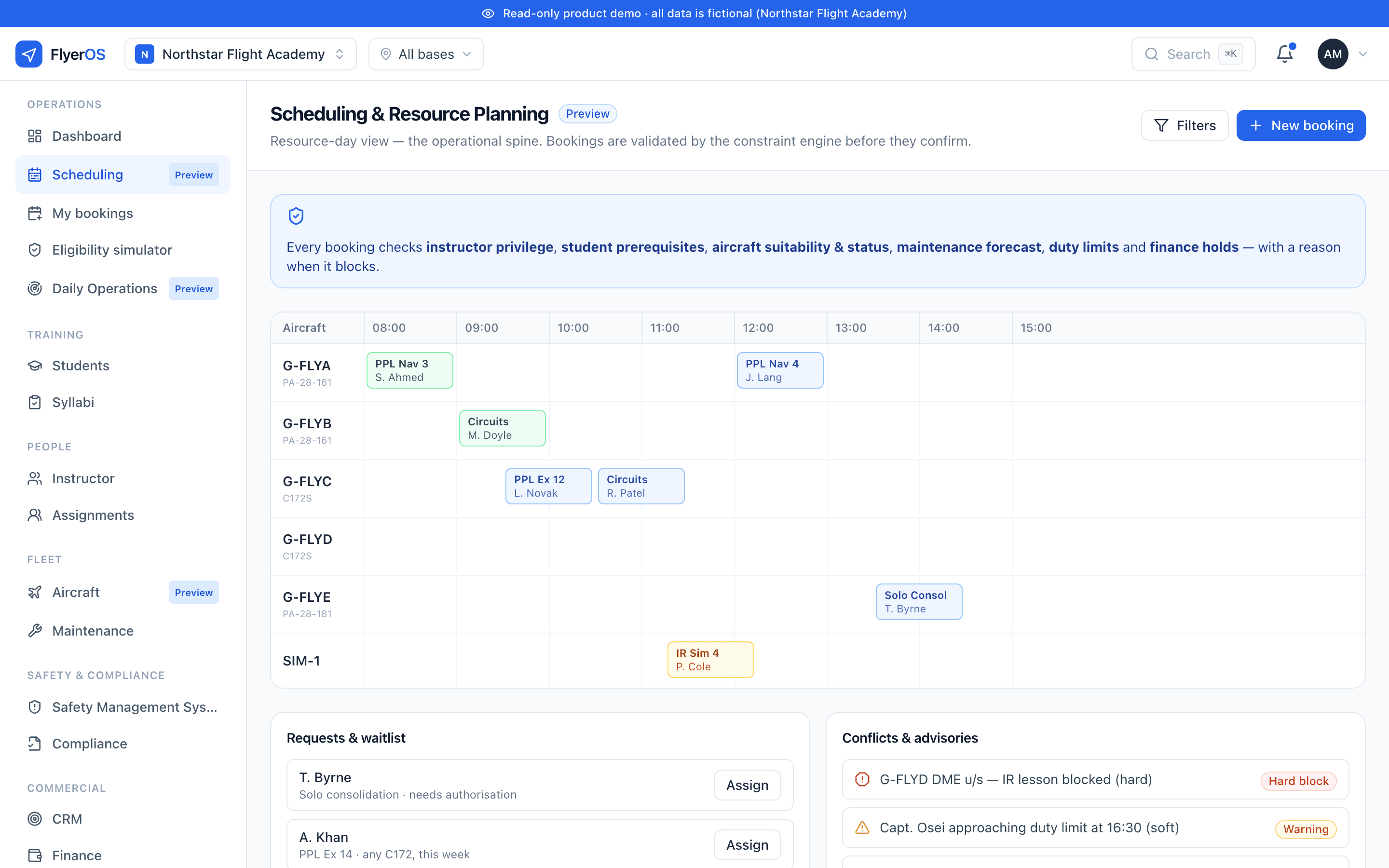
Constraint-aware scheduling · demo data
Already running FlyerOS

Founding customers
We're selecting five founding schools
The first five get the annual rate, paid monthly, with no upfront cost for a year, free migration, and a direct line to the people building the software. 4 of 5 places remaining.
Open it at seven. That’s the whole school.
Who is flying, in what, with whom, and what needs a decision before the first aircraft moves. Not four systems reconciled by hand. One screen, current, and the same screen for everyone who needs it.
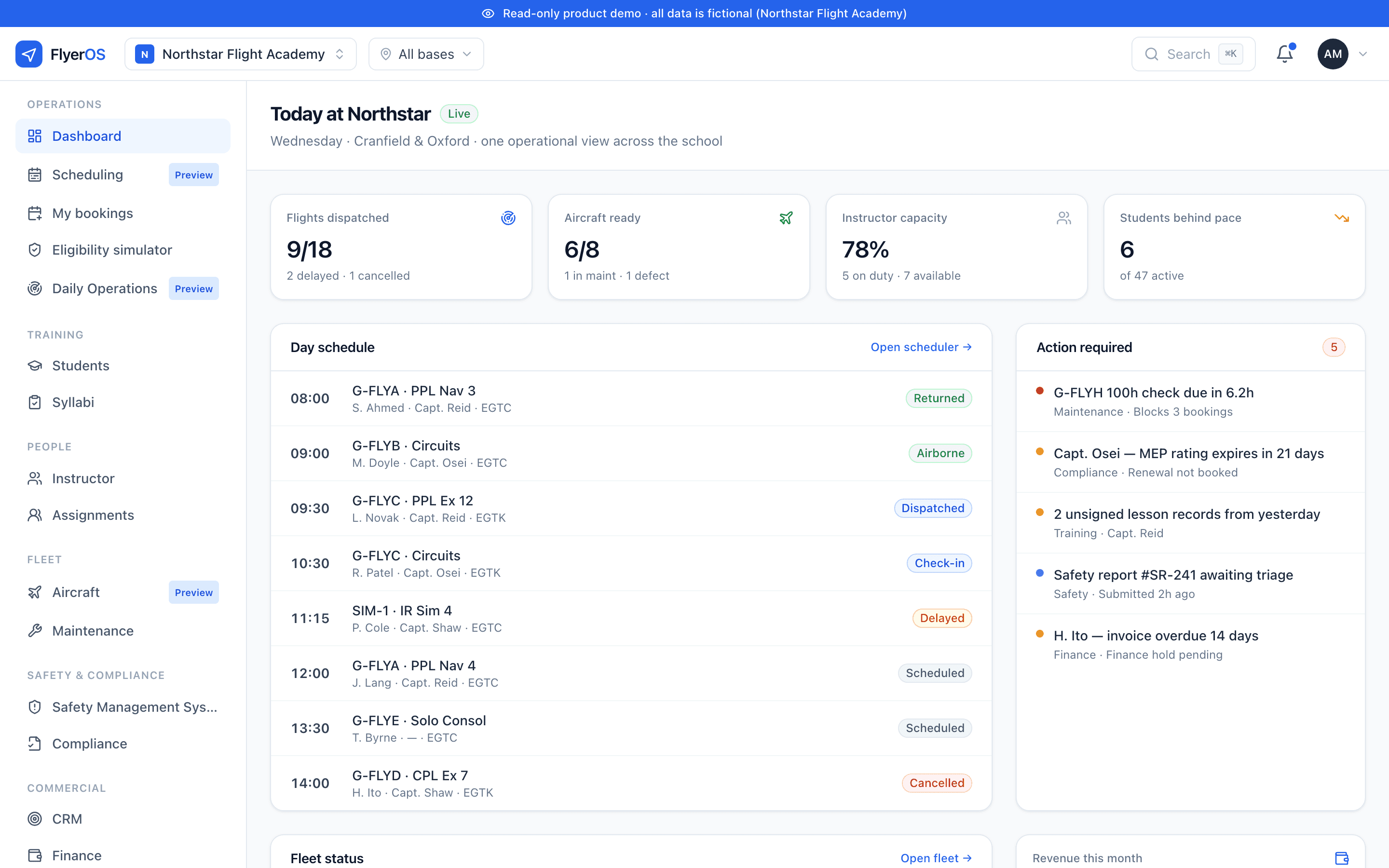
The Today board · demo data
Booked. Briefed. Checked in. Dispatched. Flown. Recorded.
One record moves through the day, and everything that depends on it moves with it. The student’s progression, the aircraft’s hours, the maintenance forecast, the instructor’s duty and the invoice are not five systems kept in step by hand. They are the same record.
- Booked
- Briefed
- Checked in
- Dispatched
- Flown
- Recorded
Then something changes. It always does.
Weather turns, an instructor calls in sick, an aircraft goes tech, a student is not ready after all. The question is never whether the day moves. It is what the move costs you on Thursday.
What actually happens
An aircraft goes tech, the bookings against it sit in the diary until someone notices.
An instructor calls in sick, their students find out when they arrive.
A student is not ready, the slot is held anyway, and someone else could have flown it.
Smart Scheduling
Every booking is checked at the moment it is scheduled, not the moment it is made, against instructor privilege, document validity, aircraft status, maintenance forecast, duty limits and finance holds. When it blocks, it says why.
Booking · G-FLYA · Circuits · J. Alcock · Sat 14:00
Blocked- Aircraft statusG-FLYA serviceable
- Maintenance forecastNext check in 6.2 hrs
- Document validityMedical & ratings in date
- Instructor privilegeFI rating expired 12 Sep
- Duty limitsWithin rolling limits
- Finance holdsAccount in good standing
This booking can’t be made. J. Alcock’s FI rating expired on 12 Sep, and the check runs again at dispatch.
Built for your shape
What kind of operation are you?
One product, configured to how you actually fly. Pick your shape and the rest of the site follows it.
Syndicate
A group or share owning one or two aircraft.
- Shared aircraft calendar
- Tech log and defects
- Cost share at month end
Club
A flying club with a membership and freelance instructors.
- Members book themselves
- Instructor availability
- Solo hire and dispatch
DTO
A club or school with a declaration, training to PPL and LAPL.
- Student records and progress
- Exam recommendations
- The annual return, assembled
ATO
An approved training organisation running professional courses.
- Roster planning and dispatch
- Full training records
- Inspection evidence packs
Academy
A multi-base integrated academy, often airline-affiliated or university-linked.
- Multi-base operations
- Cohorts and sponsor access
- Reporting that rolls up
Records that stand up
Who signed it, who changed it, and when.
Who signed that lesson. Who changed a grade after the fact. Who deferred that defect. Who moved a booking the morning of a skill test. Every record carries its own history in place: created by whom, every amendment, who made it, when and why. It is append-only, so the original is never overwritten and a correction sits visibly beside what it corrected.
In most schools this lives in a paper folder, a shared drive and somebody’s memory. Here it is a by-product of running the day, maintained by nobody.
A medical expires mid-course. The booking that would have been a solo fails before anyone drives to the airfield.
An ARC lapses. The aircraft cannot be dispatched, and the reason is on the screen of the person trying.
The grounding is specific: Part-ML for continuing airworthiness, ORA.GEN.220 for record-keeping, and CAP 1298 for training records. FlyerOS helps you operate your approved or declared procedures. It does not itself confer certification or approval.
See what an inspection asks forSigned, bound to the record
A lesson is signed by an identified person, and the signature binds to the record, not a printout that can be swapped later.
Corrections never overwrite
An amendment is appended with who, when and why; the original stands beside it and the history is intact.
Scoped by role
An instructor sees their assigned students; an accountable manager sees everything. The trail is the same underneath.
Inspection evidence packs
Scoped, date-filtered, expiring bundles that show evidence without opening the whole system.
See it in action
Real screens from the product
Captured from the FlyerOS demo environment. The data is fictional; the software is not.
A booking that checks before it confirms
- Aircraft, instructors and rooms each on their own row
- An out-of-check aircraft cannot be booked by accident
- When a flight cannot go ahead, it says why
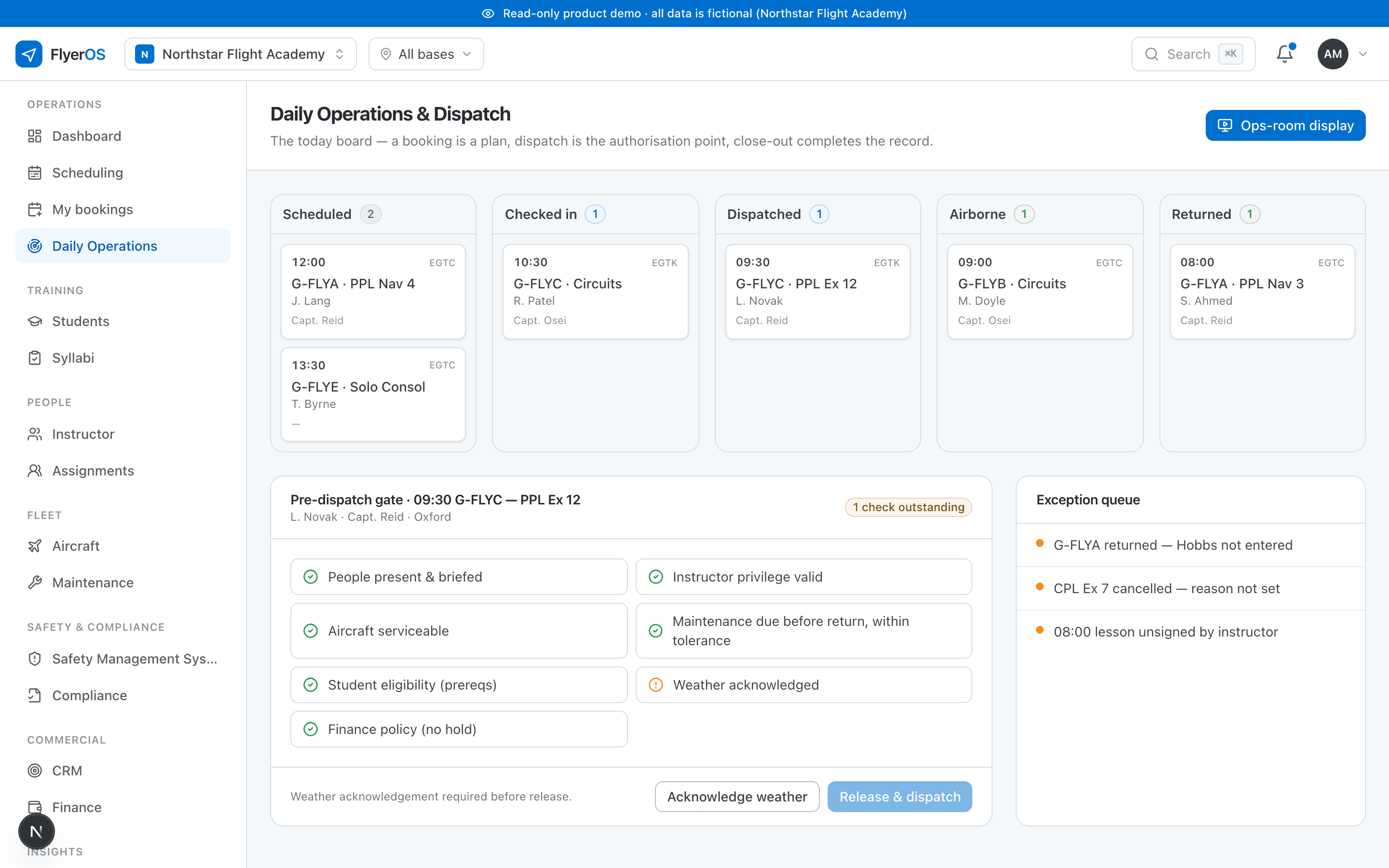
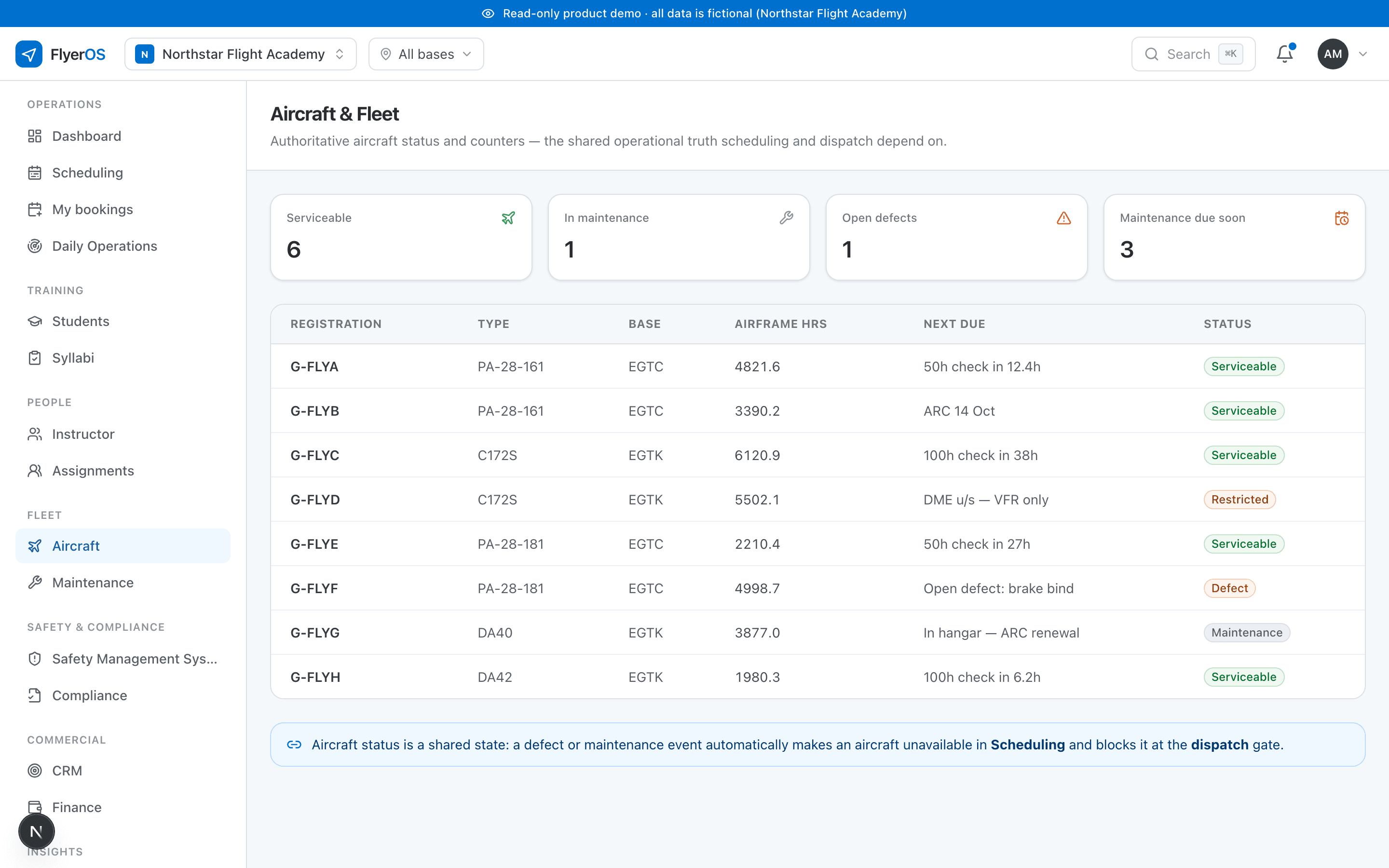
Cropped details, shown larger · demo data
The whole platform
Everything a flight school runs, in one place.
13 areas are live today, with more in preview and on the near roadmap. Every one is tagged, so you always know what you are buying now versus what is coming, and nothing is oversold.
Operations
- Scheduling & Resource PlanningLive
- Daily Operations & DispatchLive
Training
- Students & TrainingLive
- Syllabi, Grading & ProgressionLive
People
- Instructor & Staff ManagementLive
Fleet
- Aircraft & FleetLive
- MaintenanceLive
Safety & Compliance
- Safety Management SystemPlanned
- Compliance & QualityLive
Commercial
- CRM & AdmissionsPlanned
- Finance & BillingLive
Insights
- Analytics & ReportsLive
Configuration
- Documents & ResourcesLive
- CommunicationsLive
- Integrations & APILive
Built for the UK
Built for how a UK flight school actually operates.
Software built for everywhere is specific about nothing. FlyerOS is built around UK CAA and EASA workflows, so the rules it enforces are your rules, with a source and an effective date.
FlyerOS helps you operate your approved or declared procedures. It does not itself confer certification or approval.
What an inspection asks forTraining records to CAP 1298
Structured, versioned and append-only, the way the CAA expects a DTO or ATO to hold them, not a spreadsheet reconstructed before a visit.
Continuing airworthiness under Part-ML
Maintenance modelled against the aircraft’s programme, so a booking that would fly it beyond its limits is refused, with the tolerance in the programme applied.
ANO rules, not paraphrases
Night and daylight limits computed from the real definitions at your aerodrome, so the schedule enforces the actual rule.
DTO and ATO structure
Declared and approved organisations modelled as they really work, with the evidence an inspector asks for produced as a by-product of the day.
Per aircraft. Unlimited users. No minimum.
Published pricing. Everything in your tier is included; nothing is sold separately.
See how your school could run on one system.
A guided walkthrough on a working version of FlyerOS, set up with your aircraft and your people. Founding schools pay the annual rate monthly, with no upfront cost for a year and free migration.
4 of 5 founding places remaining.